

Your Nashville insider, in your pocket
The FREE InsideNash App is built by a local musician and rideshare driver who knows Music City from the inside out.
The app uses your location to show what's good right now, near you. Happy hours, live music, and venues sorted by walking distance, plus favorites you can save for the trip.
Download the InsideNash AppWhat's in the app
Inside info from a local who drives and plays here. Real Broadway drink prices before you order, where a PBR runs $3 at one bar and $12 at the next, and cocktails go from $11 up to $42 for a Tito's and soda at a celebrity-owned bar.
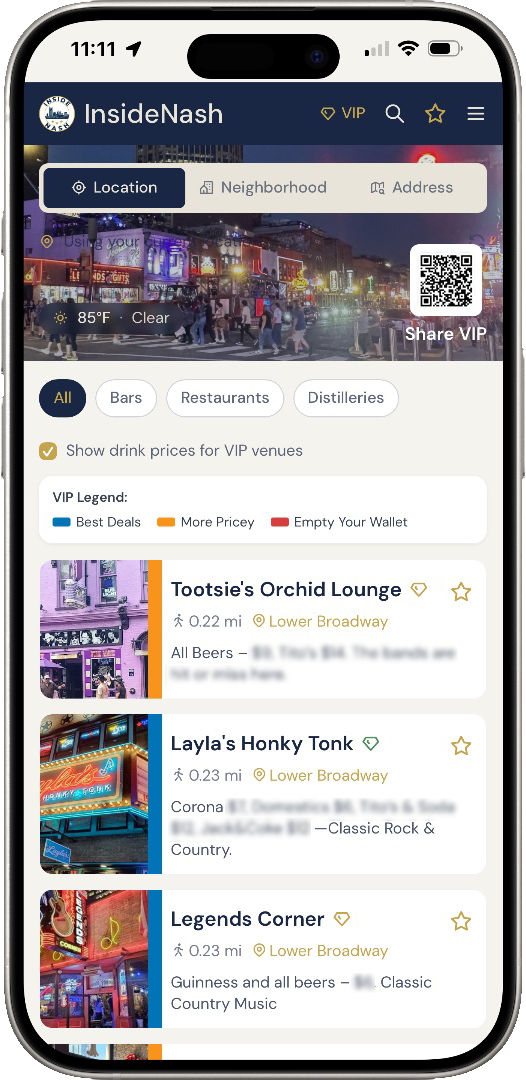
What's good right now, near you
The app shows the restaurants and bars near you with honest information: happy hours, live music, drink prices, and specials. It also points you to neighborhoods you might overlook if you figure Nashville is just Lower Broadway.
Real prices, real recommendations
Broadway drink prices so you know before you order. Brunch spots, songwriter rounds, and the places locals go that the tourist lists skip. Save any of it to favorites for the trip.
Free, no account needed
No sign-up, no email. Open it and start browsing.
How the app uses your location
The app asks for your location for one reason: to show what's close to you and sort venues by walking distance. That's it.
It checks where you are when you open it to find nearby spots. It does not follow you around in the background.
You can also say no. The app still works without location, you just browse and sort on your own instead of by distance, and you can switch it on later if you change your mind.
Download the InsideNash AppAdd it to your home screen
The button above opens InsideNash in your browser, where it works right away with no install needed. Native App Store and Google Play versions are on the way. In the meantime, if you want it on your home screen so it launches like a regular app, here's how.
On your iPhone or iPad
- In Safari, tap the three-dot menu in the bottom right and select Share.
- Scroll down and tap Add to Home Screen.
- Tap Add, and the InsideNash App is installed on your home screen.
On your Android phone or tablet
- In Google Chrome, tap the three-dot menu in the top right.
- Scroll down and tap Add to Home screen and select Install.
- Confirm, and the InsideNash App is installed on your home screen.